How to tell if a video is AI
Updated November 2026
AI video got good, and old giveaways like extra fingers mostly don’t work anymore. No single check proves anything, but a few together usually tell you. Start with where the video came from, then look closely.
1. Check who posted it
- Find the original. Viral clips get reposted by accounts that collect them, and every repost loses context. Look for the first upload and the account that made it. A screenshot of a frame in Google Lens often turns up earlier copies.
- Read the caption and hashtags. Many creators say it outright: “AI”, #aivideo, or the tool they used. In the videos we check, the caption gives it away far more often than any watermark.
- Look at the account. A page that posts a new jaw-dropping clip every few hours, all in the same glossy style, is often an AI page.
- Read the comments. People are quick to point out a glitch, and on X, Community Notes often flag AI videos.
2. Look for an AI label
Every big platform labels some AI videos, either because the creator said so or because the platform detected it.
- TikTok: an AI-generated label. Creator labeled as AI-generated means the creator added it. Otherwise TikTok did, because it detected AI or the video was made with TikTok’s own AI tools.
- Instagram and Facebook: an AI content label on the post (it used to say AI info). If AI was only used to edit a post, the details are in its ··· menu instead. On Instagram, accounts of AI-made people show AI-generated profile.
- YouTube: an AI label under the player, or on the video itself in Shorts, for realistic AI. YouTube adds it on its own when it detects AI the creator didn’t disclose. For animated or lightly edited videos, look in the description under “How this content was made”.
- X: a Made with AI label under the post. Creators add it themselves (X adds it to some images too), so plenty of AI videos go without.
A label is a strong sign. No label means very little: most AI videos aren’t labeled, because creators skip it and reposts lose the tags.
3. Look for a watermark
Some tools stamp a small logo in a corner of the video: Veo does, and so do the free plans of Kling, Hailuo and Runway. Old Sora clips carry a moving Sora logo. But logos are easy to crop or blur, Google made its visible watermark optional in August 2026, and paid plans often leave it off. A missing logo proves nothing, and a blurry or cropped corner can be a clue.
Many tools also hide an invisible watermark in the video, or attach Content Credentials, a record of how the file was made. If you have the video file, there are two free checks:
- SynthID Detector looks for Google’s SynthID watermark, which everything made with Gemini or Veo carries, and which OpenAI, NVIDIA and Kakao use too. You can also upload a clip of up to 90 seconds to the Gemini app and ask “Was this generated using Google AI?”
- Content Credentials Verify reads Content Credentials, if the file still has them.
Both only find their own marks, so “not detected” doesn’t mean real. Most platforms strip Content Credentials when they re-encode a video, and most video tools don’t use SynthID.
4. Look closely
Watch the whole clip, more than once, full screen, and pause on the busy moments. In a 2026 study, people caught far more fakes by watching a clip than from a single frame. AI still struggles with:
- Text and symbols: signs, labels, jerseys and plates that blur, shift or don’t spell anything; flags with the wrong pattern.
- Things that change: objects, cars, clothes or people that morph, appear or vanish from one moment to the next.
- Physics: water, fabric and crashes that move wrong; things passing through each other; animals moving in ways real ones don’t.
- Shadows and geometry: shadows falling different ways, reflections that don’t match, lines that should meet but don’t.
- Crowds and backgrounds: blank or blurred faces, people merging, look-alike outfits, cheering that moves in jerks.
- The camera: a perfectly smooth glide, a subject framed just right, or a camera that happens to be in exactly the right place for something nobody could have planned.
- A too-perfect look: glossy light, flawless skin and a movie sheen on something that’s supposed to be a phone video.
- Length: many AI clips are a single shot of about 8 to 15 seconds, or a montage of them. Newer tools make 30-second shots, though, so length counts for less than it did.
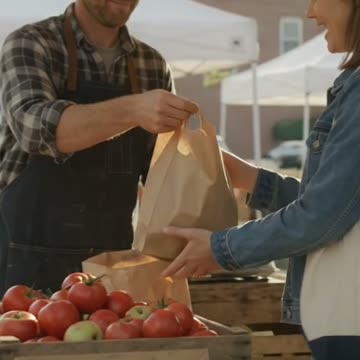 0:03 · empty
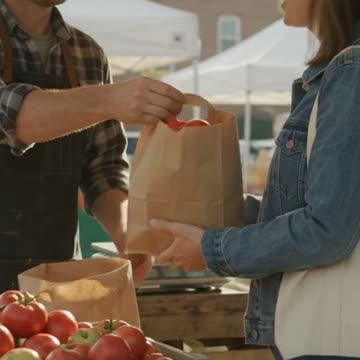 0:04 · tomatoes inside
Hands were the old giveaway. AI rarely gets fingers wrong now, and light can fool you: in March 2026, people pointed to a “sixth finger” in a real video of Netanyahu. Don’t lean on hands.
5. Listen
Most video tools make sound now, speech included. Watch the lips on b, p and m sounds, where the mouth has to close: AI lip sync often slips there. Listen for flat, too-clean voices and background sound that doesn’t fit the place.
6. Check the story
- Search what it shows. A real event usually leaves a trail: news reports, other angles, local accounts posting it the same day.
- Check the fact-checkers. PolitiFact, Snopes, Lead Stories, Full Fact, Reuters and AFP all cover viral AI videos. In January 2026, a video of Venezuelans celebrating Maduro’s fall passed 5 million views on X before fact-checkers showed it was AI: the signs were gibberish, the flags had seven stars instead of eight, and people vanished mid-shot.
- Notice repeats. AI trends come back with a different car, animal or city. If you’ve seen the story before, be suspicious.
What makes real video look fake
Plenty of real clips look strange, and calling real footage AI misleads people too. In November 2026, people claimed real dashcam footage of a plane crash in Palm Beach was AI. Before you call it, rule these out:
- Reposts and compression: each download and re-upload squeezes the video, leaving blocky smears, mushy faces and flicker.
- Frame blending: when a clip is converted to a different frame rate, frames blend into each other, so moving things look ghosted or see-through. It’s easy to mistake for an AI glitch. We have, ourselves.
- Filters and touch-ups: beauty filters, face effects, background blur and AI sharpening change real faces and scenes. In 2025, YouTube quietly tested unblurring and denoising Shorts, and creators said it made their real videos look AI-made.
- Stabilization and slow motion: stabilization warps the edges of the frame, and some slow-motion effects invent frames between the real ones.
- Real life is weird: unusual animals, strange weather and odd lighting happen. “Too strange to be real” isn’t evidence on its own. When we checked 819 viral videos people asked @grok about, more than half came out real.
Guides by platform: TikTok · Instagram · YouTube · X · Reddit. Checking a photo instead? How to tell if a photo is AI.
Still not sure? Check it with Aethyl
Share the post to Aethyl, paste its link, or upload the video. Five AI models look at it, and you see what each one found, plus a timeline that shows where in the clip it looks off. Here’s how it works.
No detector is right every time, ours included. In November 2026, a fake tug-of-war between a VW Beetle and a Cybertruck fooled well-known detectors, even though its glitches were easy to see. Treat any detector’s answer as one more signal, and use it with the checks above.
Check the next video that makes you wonder.
Free on the App Store and Google Play.